
Veo 3.1, Gemini Omni or Google Vids: Which AI Video Tool Is Actually Worth Using?
AI video creation is becoming easier, but choosing the right tool is getting harder.
Google now has several powerful AI video technologies and products, and three names are attracting particular attention: Veo 3.1, Gemini Omni, and Google Vids.
But are they really competing products?
Not exactly.
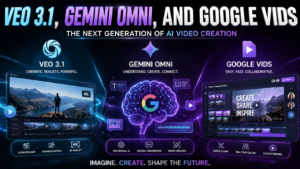
Veo 3.1 is focused heavily on AI-generated video. Gemini brings multimodal intelligence and natural-language interaction into Google’s ecosystem, while Google Vids is designed as a broader video creation and editing workspace.
Understanding that difference can save you money, time and a lot of experimentation.
If you are a creator, marketer, business owner, educator or simply someone who wants to make professional-looking videos without traditional production equipment, this guide explains what each option does, how to use them, what may be available for free, how pricing works and which one makes the most sense for your needs.
What Is Veo 3.1?
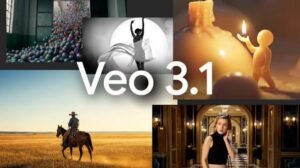
Veo 3.1 is Google’s advanced video generation model.
Its purpose is to turn creative instructions and visual references into generated video. Google has continued improving the model with features designed to provide better control over subjects, scenes and visual consistency.
One of its important developments is the ability to work with images as references. Google’s Ingredients to Video approach allows creators to provide visual ingredients and use them to guide the resulting scene.
The model also supports vertical video generation in supported environments, which is particularly useful for short-form content.
That makes it useful for:
- Social media videos
- Product demonstrations
- Advertising concepts
- Cinematic scenes
- Storyboards
- Creative experiments
- Marketing visuals
- Short-form content
The biggest advantage is creative generation.
You can describe the scene you want instead of filming it from scratch.
For example:
Create a cinematic product advertisement showing a premium smartwatch on a dark glass table, with soft studio lighting, realistic reflections and a slow camera push toward the product.
The more clearly you describe the visual requirements, the more direction the model has to work with.
What Is Gemini Omni?

Gemini Omni is better understood as part of Google’s broader multimodal AI direction rather than simply another standalone video generator.
Google has introduced Gemini Omni capabilities into Vids workflows, allowing users to work with video generation and editing through natural-language instructions.
This changes the way people can interact with video creation tools.
Instead of thinking only in terms of timelines, buttons and editing controls, users can describe what they want to create or modify.
For example:
Make the opening scene more energetic, keep the main character consistent and change the background to a modern office.
This type of interaction can be especially useful for beginners and business users who may not have professional video-editing experience.
The important point is that Gemini Omni and Veo should not automatically be treated as identical products.
One represents broader multimodal AI capabilities, while Veo is specifically designed around video generation.
What Is Google Vids?

Google Vids is Google’s video creation and editing platform, particularly designed for work and business communication.
Instead of concentrating only on generating individual AI clips, Vids provides a wider production environment.
It can help users create videos, organize scenes, record content, edit projects and collaborate with other people.
Google positions Vids for use cases such as:
- Employee training
- Business presentations
- Product announcements
- Customer communication
- Educational content
- Internal updates
- Marketing videos
- Screen recordings
The platform also connects with Google Workspace, making it useful for organizations already working with Google Drive and other Workspace applications.
This is one of the biggest differences between an AI video model and a complete video application.
A generation model creates visual material.
A platform such as Vids helps turn that material into a finished communication.
Veo 3.1 vs Gemini Omni vs Google Vids
The simplest way to understand the three is to look at their roles.
| Category | Veo 3.1 | Gemini Omni | Google Vids |
|---|---|---|---|
| Primary role | Video generation | Multimodal AI assistance | Video creation workspace |
| Best for | AI-generated footage | Natural-language creation and editing | Complete video projects |
| Text prompts | Yes | Yes | Yes |
| Image references | Supported | Supported in relevant workflows | Supported |
| Traditional editing | Depends on host platform | Through supported integrations | Yes |
| Business workflow | Not its main purpose | Useful | Strong |
| Collaboration | Depends on platform | Through integrated products | Yes |
| Recording | No | Through supported apps | Yes |
| Templates | Depends on platform | Through supported apps | Yes |
| Best audience | Creators and developers | AI-focused users | Businesses and teams |
The key distinction is important:
Veo is the video-generation technology, Gemini provides broader AI intelligence, and Vids is the application where many of these capabilities can be used in a complete workflow.
Is Veo 3.1 Free?
This is one of the most searched questions, but there is no single answer for every Google product.
Access depends on the specific service, account and plan.
Google has offered free access to certain video-generation capabilities through Vids, while paid Google AI and Workspace plans can provide additional features or higher usage limits.
Google announced in 2026 that users with a Google account could generate a limited number of Veo 3.1 clips in Vids without paying, with the specific allowance subject to Google’s current product rules.
The important lesson is simple: do not assume that every Google AI product has the same quota.
Free access can have generation limits, while paid plans may provide higher limits or additional capabilities.
Before purchasing anything, check Google’s current plan information for your account and region.
How Much Does Google Vids Cost?
Google Vids is connected to Google’s Workspace and AI subscription ecosystem, so the cost depends on how you access it.
Workspace plans are priced per user, while consumer AI subscriptions have their own pricing and feature structures.
Google Workspace has historically offered different business tiers, with higher plans providing additional storage, administrative controls and advanced capabilities.
For businesses, price should therefore not be the only consideration.
A company should also look at:
- AI usage limits
- Storage
- Collaboration
- Security
- Administrative controls
- Recording capabilities
- Available AI features
- Number of users
A cheaper plan is not necessarily better if your team regularly produces video.
How To Use Veo 3.1
The quality of your result depends heavily on the quality of your instructions.
Avoid prompts like:
Make a cool video.
That leaves too many decisions to the model.
Instead, explain the important visual elements.
A strong prompt can include:
Subject: What should appear?
Environment: Where is the scene taking place?
Action: What is happening?
Camera: How should the camera move?
Lighting: What type of lighting is required?
Style: Realistic, cinematic, commercial, documentary or something else?
Composition: Close-up, wide shot, overhead or portrait?
Consistency: Which objects or characters must remain unchanged?
For example:
Create a realistic vertical commercial showing a premium wireless headphone on a modern desk. The camera slowly moves from left to right while warm morning light enters through a window. Keep the product design consistent throughout the scene, with realistic shadows, reflections and shallow depth of field.
This gives the model much more useful information.
How To Use Google Vids
Google Vids is more suitable when you want to build an entire project.
Start by deciding what the video needs to accomplish.
For example:
Create a 60-second product introduction for a US software company. Explain the customer’s problem, introduce the solution, highlight three benefits and finish with a clear call to action.
From there, you can develop the structure, scenes and supporting material.
If your project uses documents or other files stored in Google Drive, relevant content can also become part of the creation process.
Once the initial structure is available, review every scene.
AI-generated drafts should be treated as a starting point, not as a final production.
Check:
- Facts
- Names
- Numbers
- Branding
- Narration
- Visual consistency
- Spelling
- Timing
- Calls to action
Human review is still extremely important for professional content.
Which Tool Is Best for Social Media?
For social media creators, the answer depends on what you need.
If your main requirement is generating individual visual clips, Veo can be extremely useful.
Its support for vertical formats makes it relevant for platforms where mobile-first video is important.
If you need a complete video with multiple scenes, narration, recordings, text and other assets, a workspace such as Vids can be more practical.
A smart workflow is not necessarily about choosing one tool.
You can generate visual assets with Google’s video model and then assemble the broader project inside an editing environment.
Which Tool Is Best for Business?
For businesses, Google Vids has an important advantage: it is designed around communication.
A marketing team might need a product announcement.
A human resources team might need employee training.
A sales department might need a product demonstration.
A manager might need a short internal update.
These projects require more than AI-generated footage.
They need structure, editing, narration, branding and distribution.
That is where a complete video workspace becomes more useful than a standalone generation model.
Which Tool Is Best for Beginners?
Beginners should focus on the final result rather than the technology name.
If you have never edited video before and want to create a complete presentation-style video, Vids may provide a smoother starting point.
If you are mainly interested in experimenting with AI-generated scenes, learning Veo prompting may be more valuable.
If you prefer describing changes in natural language instead of manually adjusting every element, Gemini-powered workflows can be particularly interesting.
Can These Tools Replace a Video Editor?
Not completely.
AI can automate many repetitive tasks, but professional video production still involves creative judgment.
A human editor may need to decide:
- Which shot communicates the message best
- Whether a scene feels believable
- Where the pacing should change
- Whether the branding is correct
- Whether the story makes sense
- Whether the final message is persuasive
AI can accelerate production, but acceleration is not the same as replacing creative direction.
The strongest results usually come from combining AI generation with human editing.
A Better AI Video Workflow
Instead of asking one tool to do everything, divide the process into stages.
Step 1: Define the objective
Know what the viewer should understand or do after watching.
Step 2: Write the script
Keep the message clear and focused.
Step 3: Create the visual plan
Decide what each scene needs to show.
Step 4: Generate supporting visuals
Use AI generation for scenes that would otherwise require significant production effort.
Step 5: Assemble the project
Bring scenes, narration, recordings and other assets together.
Step 6: Review everything
Check factual claims, visuals, spelling and brand consistency.
Step 7: Export and publish
Choose the appropriate format for the destination platform.
This approach is more reliable than expecting a single prompt to produce a perfect ten-minute video.
Read More:- Lottery Powerball Jackpot Hits $975 Million: Did Anyone Win?
What Should You Choose?
There is no universal winner.
Choose Veo 3.1 when visual generation is your main priority.
Choose Gemini-powered workflows when natural-language AI interaction and multimodal assistance are important to you.
Choose Google Vids when you need a broader environment for creating, editing and sharing professional videos.
For many businesses, Vids can be the most practical starting point because it addresses more of the production process.
For creators experimenting with cinematic AI footage, the underlying video-generation model may be more important.
Final Verdict
The biggest misunderstanding around Veo 3.1, Gemini Omni, and Google Vids is assuming that they are simply three versions of the same product.
They are not.
Veo focuses on generating video.
Gemini provides broader AI capabilities that can assist with creation and editing.
Vids provides the workspace where users can turn ideas and generated material into complete videos.
That distinction makes the decision much easier.
If you want a generated clip, start with the video model.
If you want AI-assisted creation through natural language, explore Gemini-powered features.
If you want a complete business workflow, look at Vids.
And if you want the best results, do not think of AI as a replacement for creative judgment. Use it as a production partner that can help you move from idea to finished video faster.
Because Google’s AI products and usage limits continue to evolve, always verify current availability and pricing before making a purchasing decision.
Frequently Asked Questions
1. What is Veo 3.1?
Veo 3.1 is Google’s advanced AI video generation model designed to create video from prompts and visual references.
2. Is Veo 3.1 free?
Limited free access has been offered through supported Google products, while additional usage may require an eligible paid plan or developer access.
3. What is Gemini Omni?
Gemini Omni refers to Google’s multimodal AI capabilities that can work across different types of media and, in supported Vids workflows, assist with video generation and editing.
4. Is Gemini Omni a separate video editor?
Not necessarily. In the Vids context, Gemini-powered capabilities are integrated into the broader video creation experience rather than functioning simply as a conventional standalone editor.
5. What is Google Vids?
Google Vids is Google’s AI-powered video creation and editing platform, particularly designed for business and workplace communication.
6. Can Vids generate AI videos?
Yes. Google’s AI video technologies are integrated into supported Vids workflows, allowing users to create generated video content.
7. Can I make vertical videos?
Yes. Google’s latest video-generation capabilities support vertical formats in supported environments, making them useful for mobile-first content.
8. Is Google Vids useful for marketing?
Yes. It can be used for product presentations, promotional communication, training, announcements and customer-facing videos.
9. Which option is easiest for beginners?
For beginners who want to create a complete project, Vids may be easier because it combines AI assistance with editing and presentation tools.
10. Which option is best for cinematic AI video?
A dedicated video-generation model such as Veo is generally the more relevant choice when cinematic AI-generated footage is the primary objective.
11. Can AI create an entire professional video automatically?
AI can create substantial portions of a video, but professional results usually require human review, editing and creative direction.
12. Can I use AI-generated video for business?
Yes, but businesses should review generated material carefully for accuracy, branding, rights and compliance requirements before publishing.
13. How can I improve AI video prompts?
Describe the subject, environment, movement, camera angle, lighting, style and important visual details instead of using vague instructions.
14. Does Google Vids work with Google Workspace?
Yes. The platform is designed to work within Google’s broader Workspace environment and can use relevant Workspace content and collaboration features.
15. Should I use one AI video tool or several?
Using several tools can be more effective when each handles a different stage, such as ideation, generation, editing and collaboration.
16. Is Veo better than Google Vids?
They are designed for different purposes. One is primarily a generation technology, while the other is a broader video creation platform.
17. Is Gemini Omni better than Veo?
It is not a direct one-to-one comparison because the technologies serve different functions. Gemini provides broader multimodal intelligence, while Veo specializes in video generation.
18. Can businesses create training videos with Vids?
Yes. Training and internal communication are among the practical business use cases for a video workspace like Vids.
19. What is the biggest advantage of AI video?
The biggest advantage is speed. Creators can experiment with concepts and produce visual material much faster than traditional production for many use cases.
20. What is the biggest limitation?
AI-generated footage can still contain inconsistencies, inaccurate details or visual artifacts. Human review remains important, especially for professional and factual content.
21. What should I learn first?
If you are new to AI video, start by learning basic prompting and video storytelling. Then learn the specific Google tools that match your workflow.
22. Is AI video ready for professional use?
Yes, for many marketing, educational, creative and business applications. However, the appropriate level of human review depends on how important and sensitive the content is.
23. Can AI video replace traditional filming?
For some concepts, yes. For others, traditional production remains necessary because real locations, actors, products, performances or precise visual control may be required.
24. What is the best choice for a small business?
A small business that needs complete videos rather than isolated AI clips may benefit from a platform that combines generation, editing, recording and collaboration.
25. What is the best way to start?
Start with one simple project. Define the audience, write a short script, generate a few visual scenes, assemble them and review the final result before increasing production volume.