
How to Use ChatGPT Data Agent: Powerful New Way to Turn Data Into Answers
OpenAI has launched the new Data agent in ChatGPT Work to help businesses analyze company data without relying on traditional manual reporting. Announced September 10, 2026, the tool can investigate business questions, explain changes, and turn analysis into interactive dashboards.
Quick Answer
To use ChatGPT Data Agent, install Data from the Plugin directory in ChatGPT Work, connect an approved data source, then start a conversation with @Data and ask a specific business question. Data can analyze connected company information, investigate trends, create interactive dashboards, and let users refine or verify the results through follow-up questions.
What Is ChatGPT Data Agent?
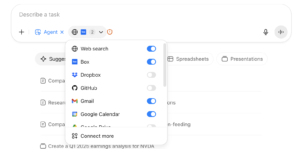
ChatGPT Data Agent is an OpenAI tool for business data analysis and dashboards. It can work with approved sources including Amazon Redshift, Google BigQuery, Databricks, MongoDB, Snowflake and ClickHouse, while available connections can also bring files and documents from Google Drive and SharePoint into analysis.
How to Use ChatGPT Data Agent
- Install Data: Open the Plugin directory in ChatGPT Work and install Data if it is not already available.
- Connect your data: Complete the required account and data-source connections.
- Ask a question: Start with
@Dataand describe the business problem, metric, timeframe and comparison. - Investigate the answer: Ask follow-up questions to compare segments, identify changes and examine the evidence.
- Build a dashboard: Ask Data to turn the analysis into an interactive dashboard or report.
For more free AI tools, visit now: https://freeaitools4u.com/
Can ChatGPT Data Agent Analyze Excel or CSV Files?
The Data agent can work with files and connected business data, but OpenAI’s September 10 announcement emphasizes connected company data and file/document sources such as Google Drive and SharePoint. For a specific CSV or Excel workflow, availability can depend on the connected source and workspace configuration, so users should verify what their Data setup supports.
Can It Create Interactive Dashboards?
Yes. Data can turn an analysis into an interactive dashboard that teams can edit, share and refresh. It can also work with visualization and BI tools including Power BI, Tableau, Sigma, ThoughtSpot and Omni when those integrations are available.
How Should You Verify Data Agent Results?
Always check the source, timeframe, filters and metric definitions before relying on an analysis. OpenAI specifically recommends reviewing the evidence behind findings and confirming that the connected data and business definitions match the intended question.
What Happens Next?
The biggest shift is from manually requesting reports to asking questions directly of business data. That makes Data Agent useful for sales analysis, financial reporting, product metrics, retention, operations and leadership dashboards.
Final Take
How to use ChatGPT Data Agent is ultimately simple: connect trusted data, ask a precise question, investigate the evidence, then turn the result into a dashboard. The real advantage is not just faster analysis, but giving more employees access to business insights through natural language.
Read More:- Wolverine PS5: Reviews Deliver a Brutal Verdict Before Launch
FAQs
1. What is ChatGPT Data Agent?
ChatGPT Data Agent is an OpenAI tool in ChatGPT Work that analyzes connected business data, answers questions, investigates changes and creates interactive dashboards.
2. How do I access ChatGPT Data Agent?
Install Data from the Plugin directory in ChatGPT Work, complete any required connections, then start a conversation using @Data.
3. What data sources does Data Agent support?
Available sources include Amazon Redshift, ClickHouse, Databricks, Google BigQuery, MongoDB and Snowflake, with additional integrations available depending on the workspace.
4. Can Data Agent make dashboards?
Yes. It can create interactive dashboards and reports that users can edit, share and refresh.
5. Is ChatGPT Data Agent available to everyone?
Availability depends on the ChatGPT Work or Codex workspace, installed plugins, connected data sources and administrator settings.
Pingback: OpenAI Slow AI Development: Major Safety Warning Raises Concerns