
Tripo AI Can Turn a Photo Into 3D — But Is It Really That Good?
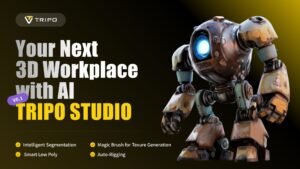
Tripo AI is making 3D creation look dramatically simpler. Instead of spending hours building geometry from scratch, creators can start with a text prompt, image, or multiple views and generate a 3D asset with AI.
But there is a bigger question behind the impressive demos: Can Tripo AI actually produce 3D models that creators can use in real projects, or is it still mostly an impressive experiment?
We tested what Tripo currently offers, including its text-to-3D and image-to-3D workflows, newer model capabilities, AI texturing, segmentation, rigging, mesh optimization, pricing, and professional use cases.
Here is what you need to know.
What Is Tripo AI?
Tripo AI is an AI-powered 3D creation platform designed to turn ideas and 2D references into 3D assets.
The platform supports text-to-3D, image-to-3D, and multiview-to-3D workflows. It also includes tools for texturing, segmentation, rigging, animation, mesh optimization, and exporting assets for broader 3D workflows.
That makes Tripo AI different from a simple AI image generator. The goal is not just to create a picture that looks three-dimensional. The platform generates an actual 3D model that can be refined and used in downstream applications.
For someone who has never opened Blender or another professional 3D application, that distinction is important.
Instead of starting with a blank viewport, the user can start with an idea.
Why Is Tripo AI Getting Attention?
Traditional 3D modeling can be slow.
A character, product prototype, game prop, architectural object, or detailed environment may require modeling, texturing, retopology, rigging, and several rounds of refinement.
Tripo AI attempts to compress part of that workflow into a much faster AI-assisted process.
Its official platform currently supports creating models from text or images, while additional tools can help divide models into editable sections, apply textures, optimize meshes, and prepare characters for animation.
That does not mean AI has eliminated professional 3D work.
Instead, Tripo AI can act as a starting point and acceleration layer for creators who would otherwise spend significant time creating the first version of an asset.
Tripo AI Text-to-3D: Describe It and Generate It
The simplest way to understand Tripo AI is through its text-to-3D workflow.
You describe the object you want and the system generates a 3D model.
For example, a creator could describe a futuristic helmet, a medieval treasure chest, a stylized robot, or a product concept.
The quality of the prompt matters. Tripo’s developer documentation recommends describing characteristics such as shape, materials, style, and scale instead of using extremely vague prompts.
That makes text-to-3D particularly interesting during the concept stage.
You do not necessarily need finished concept art before exploring an idea.
A written description can become a first 3D version that you can inspect, modify, texture, or use as a reference.
Tripo AI Image-to-3D Could Be the More Interesting Feature
For many users, image-to-3D may be more useful than starting from text.
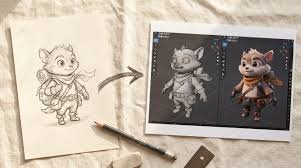
Instead of explaining an object with words, you can provide an image and let the AI reconstruct a 3D representation.
Tripo supports image-based generation and its current documentation lists several model versions for image-to-model workflows.
This can be useful when the creator already has:
- A concept illustration
- A product reference
- A character design
- A sketch
- A collectible figure reference
- A game asset concept
- A visual prototype
The important limitation is that a single image does not contain every side of a physical object.
AI has to infer unseen geometry.
That means creators should treat image-to-3D as reconstruction rather than expecting a photograph to magically contain perfect information about every surface.
Tripo AI and Multiview Generation
Tripo has also expanded its multiview workflow.
Its platform supports multiview-to-3D, while recent updates added tools for generating and editing multiple views from a single input image. The idea is to provide additional visual information that can help with 3D reconstruction.
This matters because 3D reconstruction becomes easier when the system has more than one perspective of the same object.
For professional workflows, that can potentially reduce some of the uncertainty created by a single reference image.
Tripo AI 3.1: What Changed?
Tripo’s H3.1 model is currently positioned as its flagship model for more complex 3D generation.
According to Tripo’s developer documentation, v3.1 supports text, image, and multiview inputs, can generate meshes with PBR output, and can reach up to 2 million faces. The documented generation speed is roughly 40 seconds without textures and around 120 seconds with textures, although actual performance can vary by workflow and processing conditions.
That is a significant step beyond the basic idea of “type something and get a 3D object.”
The model is designed for situations where geometry quality and fidelity matter more than simply generating something as quickly as possible.
What Can You Do With a Tripo AI Model?
The platform is aimed at more than hobby experiments.
Tripo AI lists use cases including characters, objects, environments, game assets, product visualization, and other 3D applications.
Potential workflows include:
Game Development
Developers can use AI-generated models as starting points for props, characters, and environmental assets.
The generated model may still require optimization and artistic refinement before being shipped in a production game, but the first-pass creation process can be much faster.
Product Visualization
Designers can experiment with product concepts without manually modeling every early-stage idea.
This can be especially useful during brainstorming and prototyping.
3D Printing
AI-generated models can provide a starting point for physical objects, although users should inspect geometry carefully before sending a model to a printer.
A generated mesh is not automatically guaranteed to be mechanically suitable, dimensionally accurate, or print-ready simply because it looks correct on screen.
Animation
Tripo also offers automatic rigging capabilities for supported models.
Its official documentation describes Auto Rigging as a way to add skeletons and skin weights to static models for animation workflows.
AR and VR
3D assets can also become useful building blocks for immersive applications, where a conventional 2D image cannot provide the same flexibility.
AI Texturing Is Another Major Part of Tripo
Generating geometry is only one part of 3D creation.
A model can have good shape but still look unfinished without appropriate materials and textures.
Tripo includes AI texturing and supports PBR-related outputs. Its current feature documentation describes texture generation as part of the platform’s broader 3D workflow.
Recent platform updates also introduced an Extreme texture quality tier, with additional credit costs depending on texture quality.
That gives users more control over how much generation quality they want to purchase.
Tripo AI Segmentation: Why It Matters
One of the less flashy but potentially useful features is model segmentation.
Instead of treating an entire generated object as one inseparable asset, Tripo can split complex models into meaningful sections.
For example, a character could contain separate areas for the body, head, clothing, or accessories.
That can make later editing and refinement easier.
Tripo specifically describes segmentation as a way to split complex models into structured, editable parts.
For serious 3D workflows, this kind of control can be more valuable than simply generating a beautiful model once.
Is Tripo AI Free?
Yes, Tripo currently offers a free plan, but it comes with limitations.
The official pricing page lists the Free plan at $0 per month, with 200 monthly credits and limitations around model storage, downloads, queue priority, and other capabilities.
Paid plans provide substantially more credits and additional functionality. The current official pricing page lists a Pro plan and a Max plan with higher credit allowances and features such as batch generation, bulk export, private models, commercial use, and other advanced capabilities.
Because AI pricing can change, users should always check the official pricing page before purchasing a subscription.
Tripo AI Pricing: What Should You Watch?
The biggest thing to understand about AI 3D pricing is that one generation does not necessarily have a fixed cost across every workflow.
Credit usage can change depending on:
- Model version
- Text or image input
- Texture quality
- Mesh quality
- Additional processing
- Other premium options
For example, Tripo’s current API pricing documentation lists different credit costs for text-to-3D, image-to-3D, and multiview generation, with additional charges associated with texture quality.
So anyone planning high-volume generation should calculate expected monthly usage rather than looking only at the subscription price.
Does Tripo AI Create Production-Ready Models?
This is where expectations matter.
Tripo AI can generate surprisingly sophisticated models, but “AI-generated” does not automatically mean “finished production asset.”
Depending on the model and use case, a professional may still need to:
- Inspect topology
- Correct geometry
- Adjust proportions
- Fix textures
- Optimize polygon counts
- Check UVs
- Modify materials
- Rig or re-rig characters
- Test the asset in the target application
Tripo itself provides tools such as Smart Mesh, AI Quad Remesher, segmentation, and rigging to address parts of this workflow.
The practical takeaway is simple:
Tripo can reduce the amount of manual work, but it does not eliminate the need for quality control.
What Are the Biggest Limitations?
Tripo AI is impressive, but it is not magic.
Complex objects can still produce unexpected geometry.
Single-image reconstruction can struggle with surfaces that are hidden from the camera.
Fine details may not always be reconstructed exactly as intended.
Textures can also require refinement.
Community feedback reflects a similar pattern: users often praise the speed and creativity of the platform while noting that results can vary depending on the input and that textures may sometimes need additional work.
That is why the best workflow is not “generate once and publish.”
It is:
Generate → Inspect → Refine → Optimize → Export.
Tripo AI vs Traditional 3D Modeling
The biggest difference is not necessarily quality.
It is time and workflow.
Traditional modeling gives artists detailed control from the beginning, but that control comes with a learning curve and significant manual work.
Tripo AI moves the process toward AI-assisted generation.
That makes it particularly attractive for:
- Fast prototyping
- Concept exploration
- Indie game development
- Product visualization
- Creative experimentation
- Early-stage asset production
- Creators without advanced modeling skills
Professional artists may also use it as a rapid starting point rather than replacing their existing software.
Who Should Use Tripo AI?
Tripo AI makes the most sense for creators who want to move quickly from an idea to a 3D starting point.
Beginners
If you are intimidated by traditional 3D software, text-to-3D and image-to-3D can provide a much easier entry point.
Game Developers
It can help generate ideas for props, characters, and environments before artists refine them for a specific engine.
Designers
Product concepts and visual experiments can move from 2D references to 3D much faster.
3D Artists
Experienced artists can use AI as an accelerator for repetitive or early-stage work.
Content Creators
Creators who need 3D assets but do not want to build everything manually can experiment with AI-generated models.
Is Tripo AI Worth Trying in 2026?
For many users, yes.
The reason is not simply that Tripo can generate 3D models.
The bigger story is that the platform is moving toward an end-to-end AI-assisted 3D workflow.
Generation, texturing, segmentation, rigging, optimization, and export are being brought into one ecosystem.
That reduces the number of separate tools a creator may need during the early stages of asset production.
Still, professional users should judge Tripo based on their actual workflow.
If you need exact engineering dimensions, highly controlled topology, or extremely precise production assets, traditional modeling and professional 3D pipelines remain important.
If your priority is speed, experimentation, and getting from an idea to a usable 3D starting point quickly, Tripo AI becomes much more interesting.
Read More:- Gemini Omni Is Changing AI Video — Here’s What Google Just Unveiled
The Bottom Line
Tripo AI is not replacing every 3D artist — but it may be changing how much work happens before the artist takes over.
Its ability to turn text, images, and multiple views into 3D assets makes it one of the more interesting tools in the growing AI 3D generation market.
The most important advantage may not be perfect models on the first attempt.
It is the ability to create, test, reject, and refine ideas much faster.
And as AI 3D models continue improving, that speed could become one of the biggest advantages for independent creators, game developers, designers, and digital artists.
For anyone curious about AI-generated 3D, Tripo AI is worth putting through your own workflow rather than judging it from a demo alone.
Frequently Asked Questions About Tripo AI
1. What is Tripo AI?
Tripo AI is an AI-powered 3D creation platform that can generate 3D models from text prompts, images, and multiview inputs. It also provides tools for texturing, segmentation, rigging, and mesh optimization.
2. Can Tripo AI generate 3D models from images?
Yes. Tripo AI supports image-to-3D generation, allowing users to provide an image as a reference for creating a 3D model.
3. Can Tripo AI create 3D models from text?
Yes. Its text-to-3D workflow generates 3D geometry from written prompts.
4. Is Tripo AI free?
Tripo AI currently offers a free plan with monthly credits and limitations. Paid plans provide additional credits and premium capabilities.
5. Is Tripo AI good for beginners?
Yes. Its text-to-3D and image-to-3D workflows can provide an easier starting point for people who do not have advanced 3D modeling experience.
6. Can Tripo AI models be used for games?
Tripo AI can generate assets intended for game and other 3D workflows, but developers should inspect and optimize models for their specific engine and performance requirements.
7. Can Tripo AI rig characters?
Yes. Tripo includes Auto Rigging capabilities designed to add skeletons and skin weights to supported models for animation workflows.
8. Does Tripo AI support an API?
Yes. Tripo provides an API for programmatic 3D generation, including workflows for developers building applications around AI-generated 3D assets.
9. What is the latest Tripo model?
Tripo’s developer documentation currently identifies Tripo v3.1 as its newest flagship model for complex 3D generation, with text, image, and multiview input support.
10. Is Tripo AI worth it?
It can be worthwhile if speed, rapid prototyping, and AI-assisted 3D creation are important to your workflow. The best choice depends on the complexity and precision requirements of the final asset.