
How to Use ChatGPT to Analyze PDF: 5 Powerful Ways to Get Answers Fast
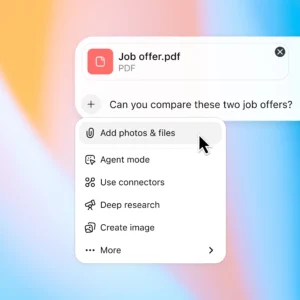
If you have a long report, research paper, contract, textbook or business document, how to use ChatGPT to analyze PDF files is one of the most useful AI workflows to learn. ChatGPT can work with uploaded PDFs to summarize documents, find specific information, compare files and extract relevant details.
Quick Answer
To analyze a PDF with ChatGPT, upload the file in a ChatGPT conversation and ask a specific question about its contents. You can request a summary, find particular information, extract facts, compare documents or identify important sections. For better results, tell ChatGPT exactly what you want extracted and how you want the answer presented.
Current Status: What Can ChatGPT Do With PDFs?
ChatGPT supports PDF analysis as part of its file capabilities. Users can ask questions about uploaded documents instead of manually searching page by page. File uploads are available on Free and paid plans, although usage limits can vary.
5 Key Ways to Analyze a PDF
- Summarize a long PDF → Ask for a short executive summary, chapter-by-chapter breakdown or key takeaways.
- Find specific information → Ask ChatGPT to locate references, names, dates, numbers or specific topics inside the document.
- Extract important facts → Request headings, bullet points, statistics, conclusions, recommendations or other specific sections.
- Compare two PDFs → Upload multiple documents and ask ChatGPT to identify differences, similarities, changes or conflicting information.
- Turn PDF information into a useful format → Ask for a table, checklist, study notes, timeline or structured summary.
For more free AI tools, visit now: https://freeaitools4u.com/
How Do I Ask ChatGPT Questions About a PDF?
The best approach is to upload the PDF and give ChatGPT a precise task. Instead of simply writing “analyze this PDF,” try prompts such as:
“Summarize this PDF in 10 key points.”
“Find every section mentioning artificial intelligence.”
“Extract all important dates and put them in a table.”
“Explain this report in simple language.”
Specific instructions make the desired output clearer.
Can ChatGPT Analyze a 100-Page PDF?
Yes, a large PDF can be uploaded, but document size and complexity still matter. Current file limits allow documents up to 512 MB per file and text/document files up to 2 million tokens per file. Very large or complicated documents may work better when analyzed section by section.
Can ChatGPT Analyze PDF Images and Charts?
PDF visual analysis depends on the ChatGPT plan and workflow. Standard document processing may rely on extracted text, while visual retrieval for embedded PDF images, charts and diagrams is currently available for Enterprise users.
What Happens Next?
The most useful workflow is simple: upload → ask → refine → verify. Start with a broad summary, then ask targeted follow-up questions about the sections or facts that matter most.
Final Take
Learning how to use ChatGPT to analyze PDF files can turn a long document into searchable, understandable information within a conversation. Whether you need a summary, specific fact, comparison or structured extraction, precise prompts generally produce more useful results.
Read More:- Ladd McConkey Injury Update: 5 Key Details Before Chargers vs. Raiders
FAQs
1. Can ChatGPT summarize a PDF?
Yes. Upload the PDF and ask for a summary, key findings, chapter breakdown or executive overview.
2. Can ChatGPT find specific information in a PDF?
Yes. You can ask it to locate mentions of specific topics, names, dates, facts or sections.
3. Can ChatGPT compare two PDFs?
Yes. Multiple documents can be analyzed together to identify similarities, differences and changes.
4. Can ChatGPT extract data from a PDF?
Yes. You can request specific facts, headings, lists, metadata or other information from a document.
5. Can ChatGPT analyze a PDF for free?
File uploads are available on Free and paid ChatGPT plans, but usage limits vary by plan and account.
Pingback: Is the New iPhone Worth Upgrading To? What Actually Changed?