
Why Is ChatGPT Not Allowing Me to Upload Images? 7 Fixes
If you’re wondering why is ChatGPT not allowing me to upload images, the problem usually comes down to the image file, an upload limit, your browser or app, or a temporary service issue. OpenAI currently supports PNG, JPEG/JPG and non-animated GIF images, with a 20MB limit per image. (OpenAI Help Center)
The good news is that most upload problems are easy to diagnose.
Why Is ChatGPT Not Allowing Me to Upload Images?
Here are the most common reasons.
1. Your image is too large
OpenAI’s documented limit is 20MB per image. If your photo exceeds that size, compress or resize it before trying again. (OpenAI Help Center)
2. The file format isn’t supported
ChatGPT supports PNG, JPEG/JPG and non-animated GIF for image inputs. If your phone or editing software saved the image in another format, convert it to JPG or PNG. (OpenAI Help Center)
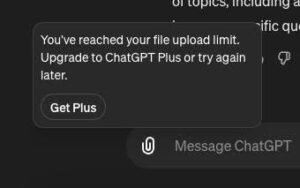
3. You’ve reached an upload limit
ChatGPT file uploads have usage limits that vary by account and plan. OpenAI also documents separate upload caps for users, so an upload may fail even when the image itself is valid. (OpenAI Help Center)
If you’re still wondering why is ChatGPT not allowing me to upload images, check whether ChatGPT is showing an upload-limit message.
4. ChatGPT is temporarily having problems
Sometimes the issue isn’t your image.
OpenAI has recorded several 2026 incidents involving ChatGPT file and image uploads, including an August 5 incident affecting conversations using files and images. (status.openai.com)
Check the OpenAI Status page before changing your device settings. It can quickly tell you whether there’s a broader service problem. (status.openai.com)
5. Your browser or app needs a reset
Try these quick fixes:
- Refresh ChatGPT.
- Sign out and sign back in.
- Try an incognito or private window.
- Temporarily disable browser extensions.
- Update the ChatGPT mobile app.
6. The individual image may be the problem
Try uploading another JPG or PNG.
If the second image works, the original file may be corrupted, unusually large or incompatible.
7. You’re uploading too many images at once
OpenAI says the number of images you can add to a conversation can depend on factors such as image size and the amount of accompanying text. If uploads fail, reducing the number or size of images can help. (OpenAI Help Center)
Quick Fix Checklist
If you’re asking why is ChatGPT not allowing me to upload images, use this order:
Check file size → use JPG or PNG → try one image → refresh ChatGPT → check upload limits → check OpenAI Status → sign in again.
If the problem continues, save the exact error message. It can help determine whether the problem is related to the file, account or service.
Bottom Line
The most common reasons why is ChatGPT not allowing me to upload images are an oversized file, unsupported format, upload limit, browser problem or temporary service issue. Start with the simplest checks before reinstalling anything.
Read More:- FanDuel Promo Code for Existing Users: 5 Amazing Ways
FAQ
1.Why can’t I upload a picture to ChatGPT?
Check the image size, format, upload limits, account and current service status.
2.What image formats does ChatGPT support?
PNG, JPEG/JPG and non-animated GIF are currently supported for image inputs.
3.What is the ChatGPT image size limit?
The documented limit is 20MB per image.
4.What should I do if I reached my upload limit?
Check your account, review your usage, wait for the applicable limit to reset and try again later.